Enterprise · Team plan
Administering your organization
The Team plan runs Peak Mind Coach across a roster — a studio, one sports team, a department. This page covers the portal at enterprise.peakmindmechanics.com: how you structure the org, bring people in, and decide in advance exactly how much of their data the org can see.
Tier: $499/mo · Team
Quick start
- Peak Mind provisions your org and names you the owner. You get an email when it’s ready.
- Sign in at
enterprise.peakmindmechanics.comwith that account. - Run the guided setup — it walks you through org type, branding, a structure review, importing people, and your data-visibility choice.
- Import your people — invite by email, or bulk-import a CSV with roles and groups.
- Set your data-visibility ceiling — the single decision that governs how much of members’ data any role in the org can ever see.
Roles & structure
The org's shape starts from a template you pick from a gallery, then you make it yours — rename everything to your language, model multiple sites, and set up how minors are handled. Underneath, the same Admin / Leader-Coach / Performer / Clinician model runs every org.
Start from the template gallery
Under Roles & Structure, open the template gallery — around eighteen ready-made starting points grouped into families: Sports (pro, college, youth, esports), Corporate (sales org, leadership development, employee wellbeing / EAP), Public safety (first responders, military), Healthcare, Education (K-12, higher-ed), Arts (performing arts), Franchise (studio, fitness), and Practice & mission (coaching practice, faith / nonprofit, government). Each one seeds a role stack, starter groups, and the terminology to match — a pro club talks about athletes and coaches; a fire service talks about a chief, sergeants, and responders. If none fits, choose Custom / start blank and build your own from the underlying primitives.
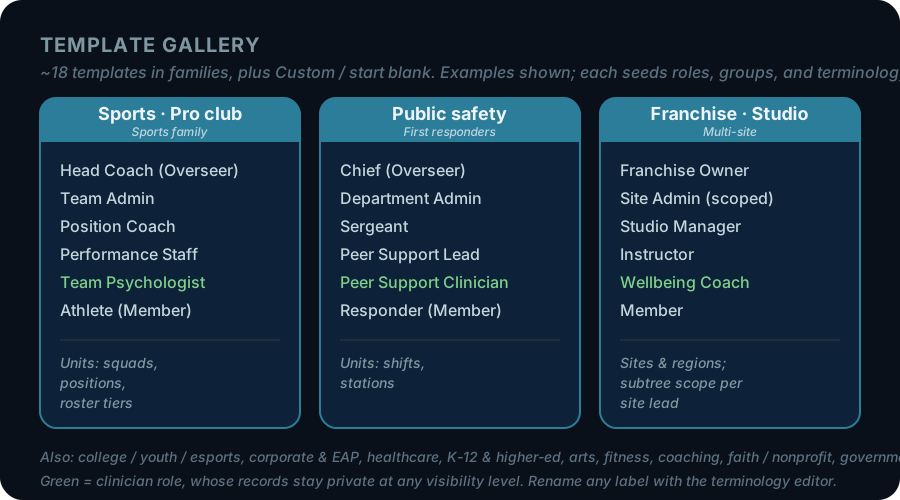
Rename everything to your language
A template picks sensible default nouns, but the terminology editor lets you rename them so the product reads in your words. You set what the org calls the organization, the person in overall charge (Overseer), a Member, the Clinician, the Admin, and a Unit / group. The same underlying model then reads as “AD / coach / student-athlete” for a college program or “chief / sergeant / officer” for a department — the roles and rules don’t change, only the labels.
Multiple sites, regions, and scoped roles
For a multi-location org, add site and region nodes to the structure and hang groups under them. A Subtree role scope then lets a regional or site lead see their own node and everything under it — but nothing in a sibling region. You can also node-scope any person’s assignment to limit their sight to a single site or group, so a local admin only ever sees their own location.
Minors & guardians
A person can wear many hats
One member can hold more than one role at once — someone who instructs, sells, and also trains as a performer holds all three. Effective access is the union of what those roles grant. Groups work the same way: they overlap and nest, and a member can belong to any number of them. You don’t have to force people into a single box.
Members & import
Three ways to bring people in. All of them respect the seat cap.
Invite by email or bulk-import a CSV
On Members, invite one person by email, or bulk-import a CSV. Each CSV row carries a name, email, phone, one or more roles, and one or more groups — groups named in the file are created on the fly. When a person accepts, any intake you staged for them is applied automatically. You can also assign or change roles and groups on a member after they’ve joined.
Seats and the cap
Team includes up to 25 Performer seats and 2 Leader seats. The cap is enforced — the 26th Performer add is blocked until you free a seat or arrange more with your Peak Mind contact. Engineer seats aren’t bundled; add them à la carte at $149.99/mo each.
Data visibility
This is the keystone decision — owner-only, and set before anyone can see anyone. The org decides in advance how deep its own sight goes.
The visibility ceiling
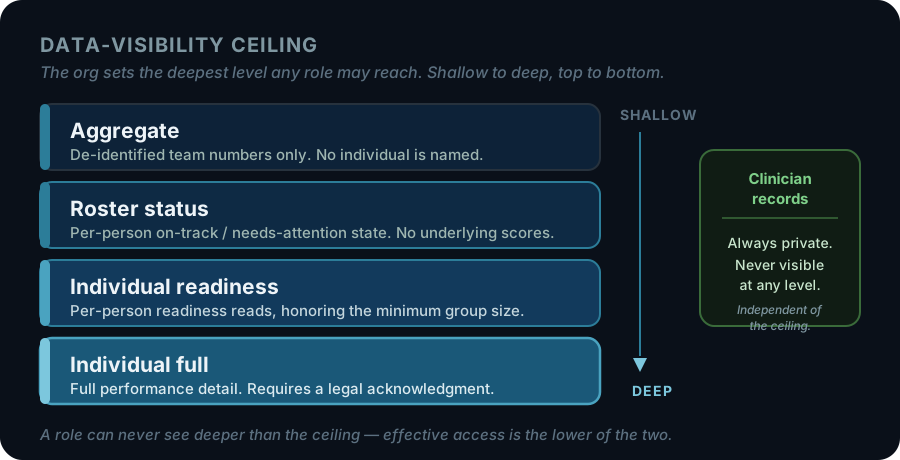
Turning on Individual full requires a legal acknowledgment: your organization is responsible for its own legal and consent basis for that depth of visibility — Peak Mind provides the mechanism, not the consent. At the two individual levels, each member decides whether to share their scores: anyone who hasn’t opted in shows check-in status only, and members can change their choice at any time. You can set optional per-group overrides to give a specific group a lower ceiling. Members are shown what the org can see before they join, and the member-transparency note (on by default) keeps it in front of them.
Clinician records are always private
Team view — reading the roster within the ceiling
Team is a firewalled, tiered read of the roster that honors the ceiling you set. At Aggregate it shows de-identified team numbers only once at least 5 people have checked in, so no single person can be re-identified; as the ceiling allows, it opens up through roster status to per-person readiness for members who have chosen to share. It never touches clinical records at any level.
Branding, billing, and access
Everything else the portal does — white-label, self-serve billing, domain auto-join and provisioning, and the audit trail.
Branding & white-label
Under Branding, set your logo, brand and accent color, label overrides (rename Performer, Leader, and Engineer), and your own welcome text for the portal. Your logo, organization name and accent color also carry into your members’ mobile app.
Billing & seats
Billing is self-serve through Stripe: one org customer, individual members don’t pay. Billing & seats shows a seat meter and a Billing Portal button to manage your card and download invoices. Seat-count and plan changes go through your Peak Mind contact. Pilot organizations set up by Peak Mind have no card on file: the seat meter works the same, and seat or plan changes go through your Peak Mind contact.
Domains & SCIM
Claim an email domain under Domains & SCIM — prove ownership with a DNS TXT record — and new signups on that domain auto-join your org at a default role. For directory-driven provisioning, mint a SCIM v2 token and point your IdP at it to create and deactivate members automatically.
SCIM provisioning is available now. Single sign-on for login (SAML / OIDC) is on the roadmap — SCIM handles provisioning today; SSO login is not yet part of Team.
Audit & Access
Every admin action is written to an org audit trail. The Audit & Access surface also gives you an access-review view that flags who currently holds elevated access, so you can confirm the org’s reach matches its intent.
What the Team plan includes
| Price | $499/mo, billed monthly. Single Stripe customer; individual members don't pay. |
|---|---|
| Performer seats | Up to 25. The 26th add is blocked until a seat frees or you arrange more. |
| Leader seats | Up to 2. Leaders rate deployment and run rosters as documented in the Leader manual. |
| Engineer seats | À la carte at $149.99/mo each — not bundled into the base plan. |
| Roles & structure | Included. A gallery of ~18 templates (plus Custom / start blank) seeds roles, groups, and terminology; terminology editor, multi-site (sites/regions + subtree scope + node-scoping), minors & guardians, and multiple roles per person. |
| Members & CSV import | Included. Invite by email or bulk-import a CSV; groups created on the fly. |
| Data-visibility ceiling | Included. Owner-only Aggregate → Roster → Individual readiness → Individual full, with per-group overrides, member transparency and per-member opt-in for scores. |
| Clinician firewall | Included and absolute. Clinical records never visible at any ceiling. |
| White-label branding | Included. Logo, colors, and label overrides in the portal; logo, name, and accent color in members' mobile app. |
| Billing & seats | Included. Self-serve Stripe with a seat meter and Billing Portal. |
| Email domain auto-join + SCIM provisioning | Included. Claim a domain (DNS TXT) for auto-join; SCIM v2 token for IdP provisioning. |
| Audit & access review | Included. Every admin action logged; elevated-access review view. |
| Single sign-on (SAML / OIDC) | On the roadmap — SCIM provisioning is available now; SSO login is not yet part of Team. |
| Buy flow | Provisioned by Peak Mind; billing self-serve via Stripe. |
Larger organizations (Org / Institution)
Organizations past Team’s shape — 100+ seats, a custom vanity domain, single sign-on, or dedicated success management — are sales-led. Reach the team directly and we’ll scope it with you.
Contact us about larger plansNeed more help?
General support
support@peakmindmechanics.com